
Call workflows & integrations
Set the steps your AI agent follows.
Build call workflows in a visual editor. Collect details, connect your systems and choose what happens next. Review the actions taken during each call.
View call workflowsSaloma AI / Platform
Phone calls, website voice, follow-up campaigns and live monitoring sit in one console. Your AI agents answer from your approved business info and connected tools. Your team watches and steps in when needed.
Updated
How it works
A customer calls your business number or uses your website call button.
The AI uses approved information and supported business tools.
Follow the workflow you set up or bring in an approved team member.
Platform features
Use business information, call workflows and human support to handle customer enquiries. Review calls and costs in the console.
Request a platform demoCall workflows & integrations
Build call workflows in a visual editor. Collect details, connect your systems and choose what happens next. Review the actions taken during each call.
View call workflowsLive monitoring & human handoff
Your team can monitor AI calls and help when needed. Listen from the console or take over in your browser. Set up phone transfers so callers can reach approved staff.
View monitoring and transfersAI voices, languages & testing
Compare AI voices and languages for your service. Test how the agent speaks and answers questions. GPT-Live also lets you describe an original voice, subject to provider access and limits.
View voices and model limitsKnowledge base & documents
Give your AI agent approved information about your services, hours and policies. Add documents and website pages to a knowledge library. Check processing status and choose each agent’s sources.
View knowledge base controlsCall reports, summaries & usage
Read call outcomes, AI summaries and available transcripts. Check workflow actions and call costs. Export usage by agent, workspace, service or date for your team.
View call reports and usageWhite-label branding & team access
Use your brand in the console, sign-in pages, emails and supported reports. Group people and agents in workspaces. Set access by role, so staff use only the tools and records they need.
View branding and team accessSetup checklist & Help Angel
Follow the checklist from business details to your first call. When enabled, Help Angel beta explains settings with source links, numbered steps and suggested follow-up questions.
View setup steps and helpSee the product
Read an AI summary, check the call outcome and inspect available decision records.
Real product screen with sample data. Controls depend on your role and setup.
View the console tour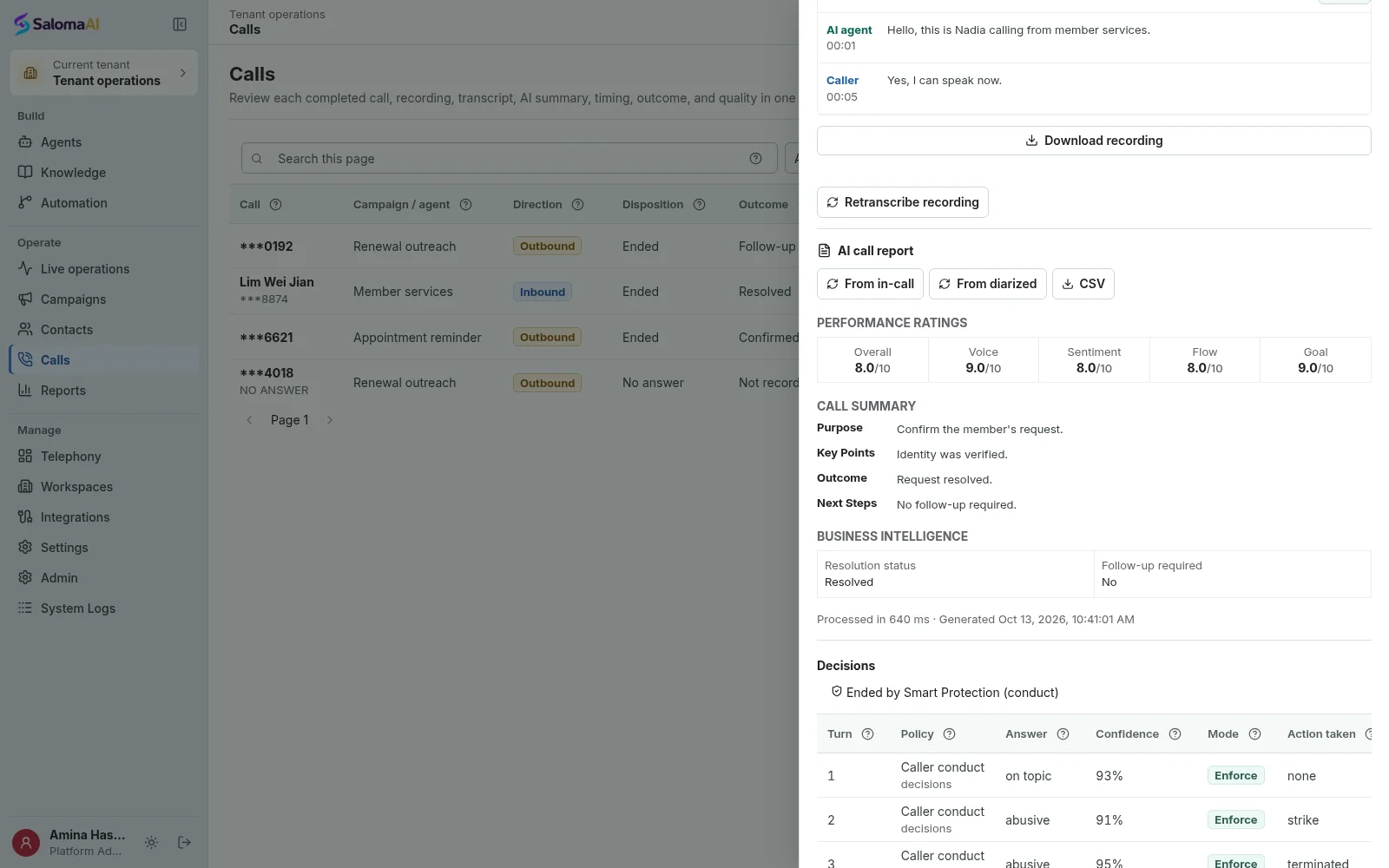
Ready when you are
Tell us how your calls work today. We will show you Saloma handling them, in your languages and with your tools.
Can’t wait? Tap the green call button and talk to Saloma now.
Already a customer? Sign in to manage your agents and calls.